هل يمكن ربط قفل الدخول الذكي بدون مفتاح المزود بمقبض وقفل باب Tuya WiFi بنظام التحكم في الوصول المستقل لتطبيق Tuya؟
على سبيل المثال، هل يمكنه تشغيل عمليات مثل تسجيل نظام التحكم في الوصول بعد فتح الباب؟
نعم، أقفال Tuya الذكية للدخول بدون مفتاح وأقفال الأبواب المزودة بتقنية الواي فاي متوافقة تمامًا مع نظام التحكم في الوصول المستقل لتطبيق Tuya. يتيح هذا التكامل ربطًا سلسًا.
يشمل ذلك تسجيل الوصول، والمراقبة في الوقت الفعلي، وميزات الأمان المتقدمة. إليك شرحًا تفصيليًا:
ميزات التوافق الأساسية
-
التحكم الموحد في الوصول
تتصل كل من أقفال الدخول بدون مفتاح (مثل بصمة الإصبع، والبطاقة، ورمز PIN) والطرازات التي تدعم تقنية WiFi مباشرةً بنظام Tuya APP المستقل. وهذا يعني:
-
إدارة المنصة الموحدة: يمكن للمستخدمين التحكم في الأقفال وعرض سجلات الوصول عبر واجهة Tuya نفسها.
-
المصادقة متعددة الطرق: تدعم بصمات الأصابع، وبطاقات RFID، وكلمات المرور المؤقتة، وفتح القفل عبر التطبيق.
-
سجلات الوصول: يتم تسجيل كل عملية فتح باب - سواء عن طريق القفل أو التطبيق - في الوقت الفعلي، بما في ذلك الطوابع الزمنية وطرق المصادقة.
-
قائم على السيناريو
الربط
يمكن برمجة النظام لتشغيل إجراءات تتجاوز مجرد فتح القفل:
-
التسجيل التلقائي: إنشاء سجلات تدقيق فورية لمراجعات الأمان.
-
أتمتة المنزل:
الربط
الأجهزة الذكية (مثل الأضواء والكاميرات) لتنشيطها عند فتح الباب
-
التنبيهات: تلقي إشعارات بمحاولات الوصول غير المصرح بها أو العمليات الاستثنائية.
-
الإدارة عن بُعد
توفر الأقفال المزودة بتقنية الواي فاي (المقترنة ببوابة Tuya) ما يلي:
-
المراقبة في الوقت الفعلي: تحقق من حالة الباب وسجلات النشاط عن بُعد
-
الوصول المؤقت: مشاركة رموز محدودة المدة مع الزوار عبر التطبيق.
-
تجاوزات الطوارئ: فتح الأبواب عن بعد في حالات الطوارئ.
-
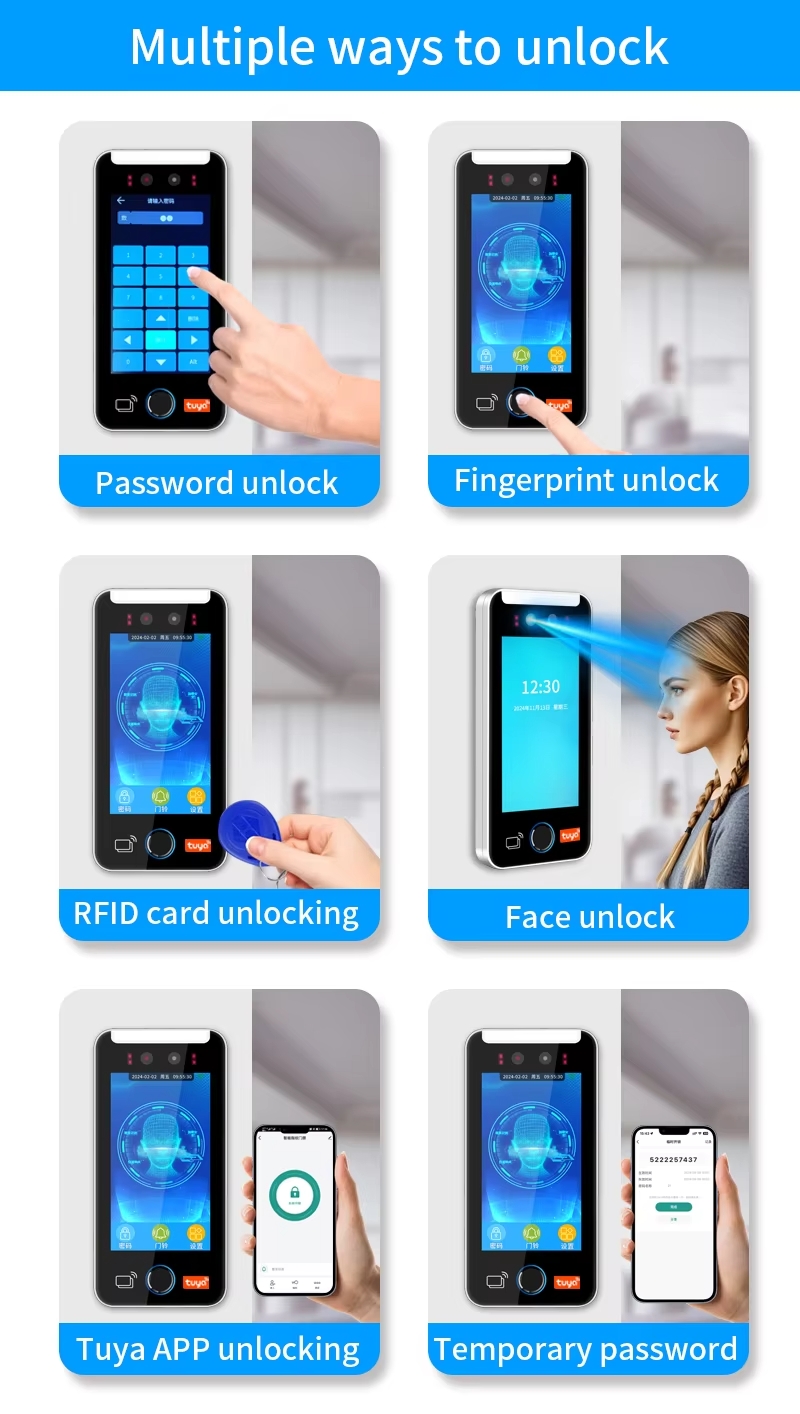
أهم الطرازات والميزات
-
سلسلة Tuya S4A (على سبيل المثال، HF2-BT):
يدعم 100 مستخدم للتطبيق و1000 مستخدم للأجهزة، مع مقاومة للماء بمعيار IP66. يتكامل مع تطبيق Tuya لإدارة المستخدمين وسجلات الوصول.
-
وحدة تحكم بشاشة لمس واي فاي T12:
يدعم 2000 مستخدم، ويدعم الوصول عبر البطاقة/الرقم السري/البطاقة + الرقم السري، ويوفر توقيتًا قابلاً للتعديل للتحكم في الأبواب.
-
نظام التحكم بالدخول المقاوم للماء TF5:
حاصل على تصنيف IP68، بسعة 10000 مستخدم ومصادقة متعددة الطرق (بصمة الإصبع، البطاقة، الرمز).
الإعداد والمتطلبات
-
طرق الاتصال:
-
أقفال الواي فاي: تتطلب بوابة Tuya (تباع بشكل منفصل) للوصول عن بُعد ومزامنة السحابة
-
أقفال بلوتوث: قم بالاقتران مباشرة مع تطبيق Tuya للتحكم المحلي.
-
إعدادات سهلة الاستخدام:
-
أضف الأقفال عبر تطبيق Tuya باستخدام رموز QR أو الاقتران اليدوي
-
قم بتخصيص الأذونات (مثل وصول المسؤول مقابل وصول الضيف) وقم بتعيين جداول الوصول.
-
إجراءات الأمان:
-
نقل البيانات المشفرة والرموز المؤقتة التي تنتهي صلاحيتها تلقائيًا
-
تنبيهات العبث وإشعارات انخفاض مستوى البطارية.
حالات الاستخدام النموذجية
-
الأمن السكني: مراقبة دخول العائلة ومنح رموز مؤقتة لعمال النظافة أو الضيوف
-
الإعدادات التجارية: إدارة دخول الموظفين وتتبع النشاط في المكاتب أو المستودعات.
-
العقارات المؤجرة: تحكم عن بعد في وصول المستأجرين واستقبل إشعارات فتح الأبواب فوراً.
الأسئلة الشائعة
-
هل أحتاج إلى بوابة منفصلة؟
نعم، بالنسبة للأقفال المزودة بتقنية الواي فاي، يمكن التحكم بها عن بُعد. أما طرازات البلوتوث فتعمل بدونها.
-
هل يمكنني عرض سجلات الوصول دون اتصال بالإنترنت؟
تتم مزامنة السجلات مع السحابة عند إعادة اتصال القفل بالشبكة.
-
هل هناك قيود على الرموز المؤقتة؟
نعم - حدد فترات الصلاحية (مثل ساعة واحدة، أسبوع واحد) وأرقام الاستخدام
بدمج أقفال Tuya الذكية مع نظام التحكم بالوصول المستقل، يحصل المستخدمون على حل متكامل وآمن يُبسط إدارة الوصول ويضمن شفافية تشغيلية كاملة. لمعرفة توافق الطرازات المحددة، يُرجى مراجعة دليل المنتج أو الاتصال بدعم Tuya.



 العربية
 English
 français
 Deutsch
 русский
 italiano
 español
 português
 Türkçe
 Tiếng Việt
 Indonesia
 شبكة IPv6 مدعومة